📢 Important Update
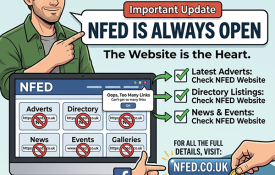
Facebook/Meta have introduced new limits on the number of links pages can include in posts (around 2 per month) unless we pay for extra features or promote Meta‑approved products. As the NFED is a completely independent website and we work hard to keep our running costs — and therefore our prices — as low as possible, we won’t be adding paid links or joining the Affiliate programme. Even if we paid, the link allowance would only last a few days.
We’ll continue sharing featured adverts, directory listings, news and events, but without the links or images. The images that used to appear on our Facebook posts were automatically pulled in from the linked NFED pages. We won’t be uploading images directly to Facebook, as doing so gives Meta permission to use them — and they’re not our images to grant that permission for. If interested, go to the NFED website to see full details, photos or contact information.
We had no warning about this change, but just as when our Facebook page was previously removed, it made very little difference to NFED traffic or overall use. The website remains the heart of everything we do. The vast majority of users go directly to the NFED or simply type “NFED” into Google — only a very small number arrive via social media links.
Ironically, now that our social posts are all text and contain no links, they’re no longer penalised by Meta’s algorithms and are actually reaching more people. So this change may even work in our favour — but to be perfectly honest, if Facebook make things too difficult, we will simply close the page and continue without it.
This only affects our NFED Facebook page — it has no impact on the NFED website, and it doesn’t stop you sharing adverts, listings or events from the site onto your own Facebook wall or groups.
Thank you for your continued support. 🙏
Additional Information About Meta’s Link Changes
Meta are gradually rolling out these link limits across Facebook, and not all pages are affected yet. Some pages can still post links normally, while others — like ours — have already been moved into the new system. Meta haven’t given any timeline or warning for when other pages will be included, but the change is expected to expand over time.
The restriction is part of Meta’s push to keep users on Facebook and encourage page owners to pay for extra features or join their Affiliate programme, Meta One. Pages that regularly post external links are more likely to be affected first, but eventually most business pages may see similar limits.
If you run a Facebook page yourself, you may find that link posting becomes restricted in the future. For now, it varies from page to page, but the direction of travel is clear: Meta want fewer unpaid outbound links on their platform.
Here’s a look at the latest NFED website visitor statistics for the past three months. 📊
These figures show actual human visitors to the core NFED website only. They do not include: Events hosted by Tockify, Social media, Facebook, X, shopping cart pages, or the weekly newsletter, which now goes out to over 12,500 subscribers. ✉️
May 2026
Unique visitors: 95,046
Number of visits: 172,335
Pages viewed: 631,996
Hits: 9,955,996
Bandwidth used: 325.94 GB
June 2026
Unique visitors: 124,724
Number of visits: 202,658
Pages viewed: 716,361
Hits: 9,018,047
Bandwidth used: 268.89 GB
July 2026
Unique visitors: 41,901
Number of visits: 115,081
Pages viewed: 648,823
Hits: 8,957,615
Bandwidth used: 252.34 GB
Continuing Growth & Community Support 🌱
Overall, we continue to have a huge following, despite the numerous social groups and alternatives that come and go. Our search results remain excellent, helped by site maps updated and submitted to Google and Bing daily. 🔍
Nothing beats a loyal following and word of mouth, so a big thank you to everyone who continues to use the NFED, advertise, or spread the word. ❤️
Your support keeps the NFED thriving and connected to the local equestrian community. 🐴
We’ve finally tracked down and resolved the software issue that caused problems when removing maps from directory listings.
You can now choose whether the map is shown on new listings, and we can remove it from existing listings on request.
The directory software and databases have also been upgraded, so emojis are now fully supported. Previously they weren’t recognised and couldn’t be displayed.
The old Google map directions, contact form, and social share buttons have been removed. These features were no longer used and often caused confusion with advertisers’ own social links. The existing links are now highlighted more clearly, and anyone wishing to share a listing can simply use the sharing options on their own device.
If you’d like your listing updated, just get in touch.
Over the last few days we’ve carried out an important behind‑the‑scenes upgrade to the NFED website. Nothing on the surface has changed, but the foundations underneath the site are now stronger, more modern, and ready for the future.
This work has improved three key areas:
1. Better reliability
NFED now uses a newer and more robust data format. This helps prevent odd character issues, improves consistency across all sections of the site, and keeps everything running smoothly.
2. Better compatibility
Modern devices, apps, and browsers all handle text slightly differently. This upgrade ensures NFED works more cleanly with today’s phones, tablets, and computers — especially when people copy and paste text from apps like WhatsApp, Facebook, Instagram, or email.
3. Emoji support
You can now use emojis throughout NFED — in the Diary, News, Directory, Classifieds, Events and more. If you want to add a smiley, a horse, a weather symbol, or a thumbs‑up, NFED will now save and display them correctly.
A few examples you can now use:
🐴 ☀️ 🌧️ 👍 😊 🎉 🏆
This upgrade doesn’t change how you use the site, but it does make NFED more flexible and future‑proof. Everything should feel exactly the same — just a bit friendlier and more reliable behind the scenes.
As always, thank you for being part of the NFED community.
We’ve noticed a rise in AI‑written adverts. That’s absolutely fine — it’s entirely up to each individual advertiser whether they choose to use AI or not — but accuracy is still essential.
To help everyone who does use AI get it right, we’ve added a new FAQ with some useful pointers on how to produce a clear, honest and complete advert.
How to Use AI to Help Write a Horse Advert
AI tools can be really helpful when creating a clear, well‑structured advert for your horse. They won’t replace your knowledge or honesty, but they can tidy up your wording and present your information professionally.
1. Start With a Strong Title (Maximum 75 Characters) 📝Your title should be short, accurate and eye‑catching.Good things to include:
Type or discipline (e.g., All‑Rounder, Dressage Prospect)
Age or height
A standout quality (e.g., Safe Confidence Builder)
🚫 Important: Don’t mention selling or price in the title if you would like the advert shared on Facebook. Facebook’s rules automatically block titles containing words like for sale, selling, £, price, etc.
Tip:Ask the AI:
Write a horse advert title under 75 characters based on the details below.
2. Provide the AI With Clear Details for the Advert Text 📋AI works best when you give it complete, honest information. Include as many of the following as possible:Essential Details:
Breeding – Known parentage or type 🧬
Sex – Mare, gelding, stallion 🚻
Type – Pony, cob, sports horse, native, etc. 🐎
Age – In years 🎂
Height – In hands (hh) 📏
Experience – Hacking, schooling, jumping, hunting, competitions 🎯
Temperament – Calm, forward, green, quirky, safe, etc. 😊⚡
Good Qualities – What the horse does well ⭐
Limitations / Honest Points – Any quirks, needs, restrictions or areas still developing ⚠️
Price – Clear and realistic 💷
Location – Optional but helpful 📍
Extras – Tack included, videos available, trial facilities, etc. 🎥🪝
Tip:Tell the AI exactly what you want:
Write a clear, honest horse advert using the details below. Include breeding, sex, type, age, height, experience, temperament, good qualities, any limitations and the price.
3. Review the AI’s Output Carefully 👀AI can help with wording, but you must check everything.Make sure:
All details are accurate
Nothing is exaggerated
Any quirks or limitations are clearly stated
The tone feels honest and suitable for NFED
The price is correct
4. Keep It Honest 🤝A good advert includes both strengths and weaknesses. Buyers appreciate transparency, and honest adverts reduce time‑wasting enquiries.5. Example Prompt You Can Copy & Paste Into Your Chosen AI Platform 💬
Please write a horse advert title under 75 characters without mentioning selling, and a clear, honest advert description. Include breeding, sex, type, age, height, experience, temperament, good qualities, any limitations, and the price. Here are the details: [insert your information].
6. Submitting Your Advert 📨When you have carefully checked the AI‑generated advert and are happy with it, copy and paste it into the submission form at: 👉 https://www.nfed.co.uk/submit.htm
Supplied by the Clerk of the Verderers
Week commencing Monday 6th July 2026
06/07/2026 Colt Foal - Injured & Destroyed Blackgutter - B3078 M Maton
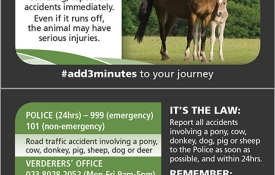
Click Here to see how to report an accident, problems with New Forest stock or driving incident.
Just a quick shout‑out to UK Servers, the newest home of the NFED!
Back in February, I was told our old hosting company was changing direction and I had just four weeks to find a new home for the website. That meant finding a new provider, renting a server, setting it up, moving everything over and testing it — all before the old one was switched off. The alternative would have been closing the NFED altogether.
Thankfully, I found UK Servers, and they’ve been brilliant. The NFED has had a few homes since launching in 1999, but this is easily the best hosting company so far. Support has been fast, friendly and efficient whenever needed.
Long may it continue — and a big thank you to www.ukservers.com.
Just a quick heads‑up: the office will be closed from mid‑morning on Thursday 18th June and will reopen on Friday 19th.
Adverts can still be submitted as normal, but they won’t be processed until we’re back, and messages won’t be monitored during this short break.
We usually manage everything well within 24 hours, but on this occasion we’ll be completely off‑grid.And sorry to anyone nearby if we end up slowing the traffic a little while we’re out and about!
Due to a recent rise in equine flu cases, several events are being cancelled.To keep everyone informed, we are leaving cancelled events in the diary but marking them clearly as Cancelled. (Under normal circumstances, cancelled events would be removed.)
Event OrganisersTo ensure the accuracy of information on the NFED:
We can only amend or update events when instructed directly by the event organiser.
If you advertise your events on the NFED, please contact us as soon as possible if any details need changing or if an event is cancelled.
Finding Cancelled EventsYou can quickly view all cancelled events by:
Typing Cancelled into the search box at the top of the Event Diary, or
Using this direct link:https://www.nfed.co.uk/calendar/search.php?ref=cancelled
We’ve been notified of a missed call that appeared to come from our number.
Please remember that NFED never phones customers, and the WhatsApp number is used only for receiving messages and photos. It cannot make or receive calls.
Any call showing our number is almost certainly a spoofed call. For your safety, never give out personal details, verification codes, or payment information to anyone claiming to be from NFED.
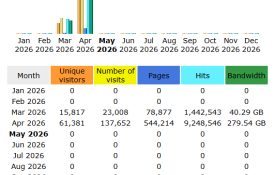
The NFED moved to its new server on 24th March, so it has now been running on the new setup for a full month. With everything nicely settled in, I thought it would be interesting to share a look at the actual visitor numbers for April. The last stats update was at 13:10, so any visits between 13:10 and midnight aren’t included in these figures.
These figures cover real human visitors only to the main NFED website — including the Classifieds, Service Directory and News pages.
All search engines, bots and automated traffic have been filtered out to give a true picture of genuine usage.
These stats focus purely on the core NFED website — the part we run directly.
Reported period Month Apr 2026
Unique visitors: 61,381Number of visits: 137,652 Pages: 544,214Hits: 9,248,546 Bandwidth: 279.54 GB
What’s NOT included:
Event Diary — hosted by Tockify, so their visitor numbers aren’t counted here, but it's busy!
Newsletter & Shopping Cart — hosted by Roman Cart, so visits to those pages aren’t included.(The newsletter currently goes out to just over 12,600 subscribers.)
Social Media — Facebook and X visitor numbers are not included.
To improve newsletter deliverability with the recent tightening of email security rules, we’ve updated the sender address for the weekly NFED newsletter.
The newsletter will now come from newsletter@nfed.co.uk instead of the old Gmail address.
This allows us to authenticate the emails properly on our server so providers like Gmail, Outlook and Yahoo can verify that the newsletter is legitimate.
If you subscribed but haven’t received the newsletter for a while, this change may mean it starts arriving again. If you no longer wish to receive it, you can unsubscribe at any time using the link at the bottom of the newsletter.
This address is used solely for sending the NFED newsletter and cannot receive or respond to messages.
If you need assistance, have a question, or want to contact an advertiser, please use the usual contact options on the NFED website.
We’ve added a brand‑new Contact Form to the NFED home page to make it quicker and easier for users to get in touch.
The new form allows you to:
Enter your name and email
Add a clear subject line
Attach photos, documents or schedules
Send your message directly to NFED Admin
As always, we aim to reply within 24 hours.
Please remember that we can only answer questions relating to the NFED website or the services it provides. Before contacting us, check any automated emails and ensure all rules and guidelines have been followed.
You’ll find the new form on the home page — just click Contact Us
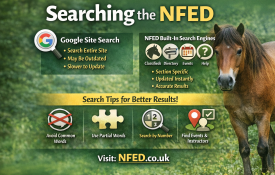
The NFED offers two types of search tools: Google Site Search for full‑site coverage, and built‑in search engines for the main sections such as Classifieds, Directory, Events, News, and Help.
Google Site Search
Google scans the entire NFED website. It’s powerful, but not always up‑to‑date:
Results depend on when Google last crawled the site
Very new posts may not appear immediately
Old items (e.g., past events) may still show for a while
Use this when you want to search everything, including older pages and static content.
NFED Built‑In Search Engines
Each major section — Classifieds, Directory, Event Diary, News, and Help — has its own dedicated search tool.
These searches:
Only cover their specific category
Update instantly
Remove expired posts automatically
Usually give more accurate and current results than Google
If you’re looking for something in a specific section, this is the best place to start.
Tips for Better Results
The NFED is a large resource, and smart searching saves time. These guidelines help you get the most accurate results:
Avoid words that appear in category titlesThey’ll return every item in that category.
Avoid common wordsWords like the, and, offered, etc., appear in many listings.
Use shared letter groups for words with multiple spellingsFor example: driving, driven, drive → search for driv
Fewer words often give better resultsEven part‑words can be more effective than full phrases.
Examples Albion Saddle
Searching for Albion finds only adverts containing that word.Searching for Albion saddle will also return every advert containing saddle, which may be far broader.
13.2 Driving Pony
People may write this as driving, driven, or drive.Searching for driving won’t find driven.Search for driv and select the 14.2hh & under – Offered category.You’ll see all adverts containing driving, driven, or drive.
New Forest Foal
Enter forest and select the Foals & Youngstock category.
Searching by Advert Number
If you know the advert number, simply enter it into the search box to go straight to that listing.
Events by Venue or Instructor
Use the Event Diary search:
Enter the venue name or instructor
Use filters to narrow by event type if needed
We’ve had a few reports this week about Facebook not showing the correct description when sharing NFED adverts or pages. This turned out to be caused by Facebook temporarily holding on to old cached information following our recent server migration.
The good news is that everything on the NFED side is working correctly, and Facebook will refresh its previews automatically as their cache updates. In the meantime, the Facebook Debugger tool shows the correct information, so it’s just a case of Facebook catching up.
Thank you for your patience while this settles.
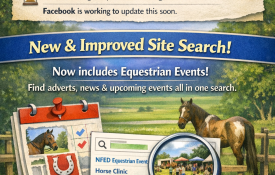
Improved NFED Site Search
While we were investigating the Facebook issue, we also took the opportunity to improve the NFED site search.
The search box will now include results from our events calendar on Tockify, making it much easier to find upcoming shows, clinics, and local equestrian activities all in one place.
This means:
Event listings are now fully searchable
Results are more complete and relevant
You can find what you need faster, whether it’s an advert, news item, or event
A small change, but one that should make the site feel more joined‑up and helpful.
Please note: Google needs a little time to re‑index the new setup, so event results may not appear straight away. This usually takes a few days, sometimes a couple of weeks. Once Google catches up, everything will work exactly as intended.
If you spot anything unusual or have suggestions for further improvements, please feel free to get in touch. Your feedback genuinely helps keep the NFED running smoothly for everyone.